Marketing Skills for Cursor, Claude Code, OpenClaw — Install 160+ skills

Branded Queries Filter: Distinguish Traffic Types

Google Search Console's branded queries filter feature launched in November 2025. This feature helps you distinguish branded and non-branded queries, analyze traffic patterns more accurately, and optimize SEO strategies and content marketing effectiveness.

Updated on November 27, 2024
12 min read
Share
TL;DR

Key Takeaways

This guide covers GSC's branded queries filter (Nov 2025): definition, usage, and impact on SEO analysis. It also covers selection criteria, comparisons, and practical tips for implementation. The sections below compare options, use cases, and practical selection criteria. The sections below compare options, use cases, and practical selection criteria.

  • Branded queries in Google Search Console can be filtered to separate brand-driven traffic from generic organic search performance.
  • Learn GSC regex filtering, query classification rules, and how to create segmented reports for branded versus non-branded analysis.
  • Consider filtering accuracy, reporting automation frequency, and how branded traffic insights directly inform your content and SEO strategy.
  • Learn technical principles and workflows, then pair with Google Tag Manager and analytics tools for complete search visibility.

Use Cursor / OpenClaw to analyze GSC data

npx skills add kostja94/marketing-skills --skill google-search-console

Star or fork on GitHub for 160+ skills

What is a Branded Query?

A branded query is a search query that contains a brand name, brand variant, or brand-related products or services.

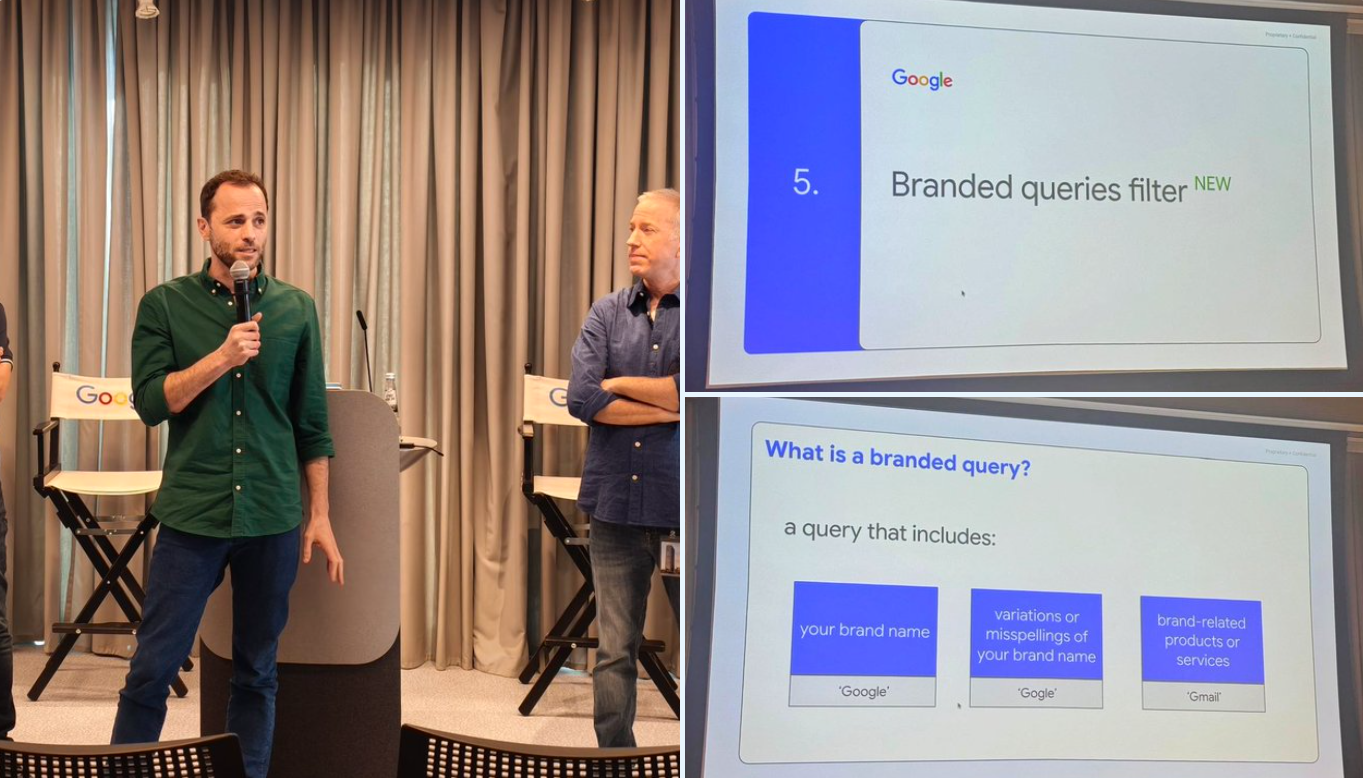
Google Search Central event demo: Branded queries filter introduction and definition

Three Types of Branded Queries:

  • Brand Name: Queries directly containing the brand name, such as searching for "Google"
  • Brand Variants or Spelling Errors: Queries containing brand name variants or common spelling errors, such as searching for "Gogle"
  • Brand-Related Products or Services: Queries that don't directly include the brand name but point to unique products or services of that brand, such as searching for "Gmail" (for google.com)

Author's Note: Products are not always strongly associated with brands. For example, Nano Banana is an unofficial name for Google Gemini 2.5. Brand terms are not always brands and may generalize into generic functional terms. For example, Inpainting was originally a brand term for Dalle, but later generalized into the general term for the "AI inpainting replacement" feature, competing with "AI Replacer."

Why Separate Branded and Non-Branded Queries?

Characteristics of Branded Queries

  • Higher rankings and click-through rates
  • Users already have brand awareness
  • Higher conversion rates

Characteristics of Non-Branded Queries

  • Organic growth opportunities
  • Content marketing effectiveness indicators
  • Long-term growth potential

By analyzing these two query types separately, you can better evaluate brand awareness, content marketing effectiveness, and develop more targeted SEO strategies. For more classification and source analysis of website traffic, refer to the article on Website Traffic Source Classification.

Real Cases: Similarweb and Semrush Branded/Non-Branded Traffic Analysis

In addition to Google Search Console, Similarweb and Semrush also provide branded and non-branded traffic analysis features. By comparing the traffic composition of different products, we can more clearly see the differences in SEO strategies.

Case 1: TemPolor - Transitioning from Branded to Non-Branded Traffic

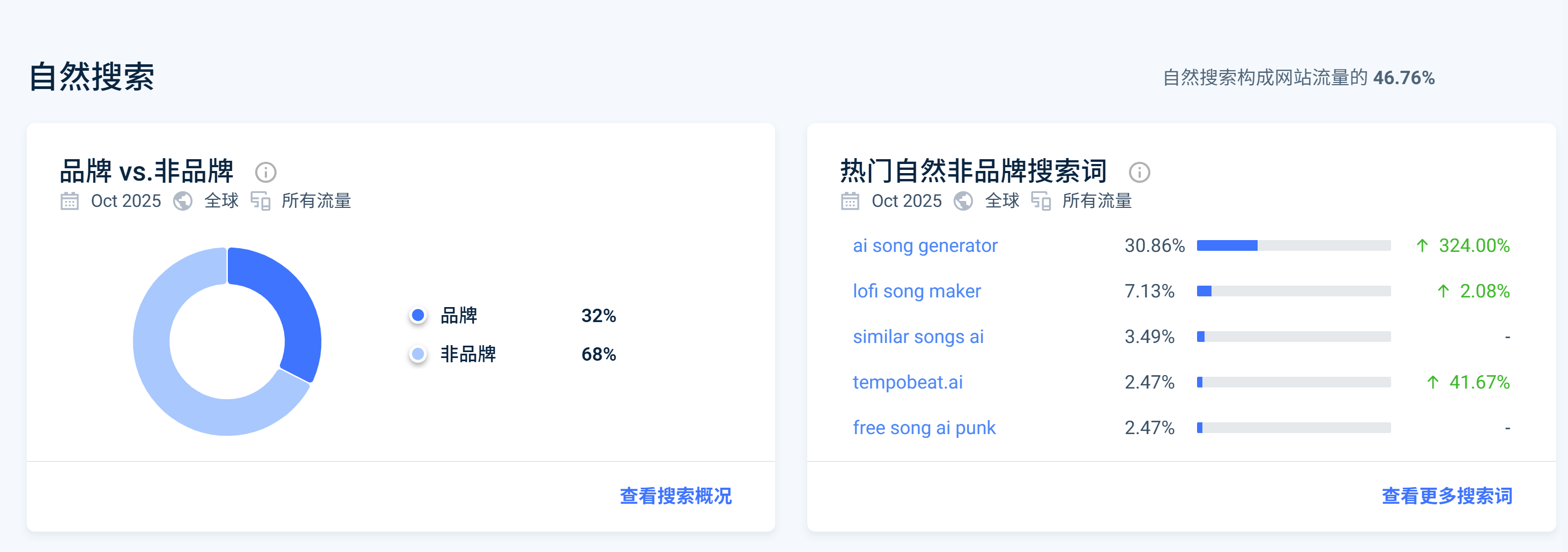
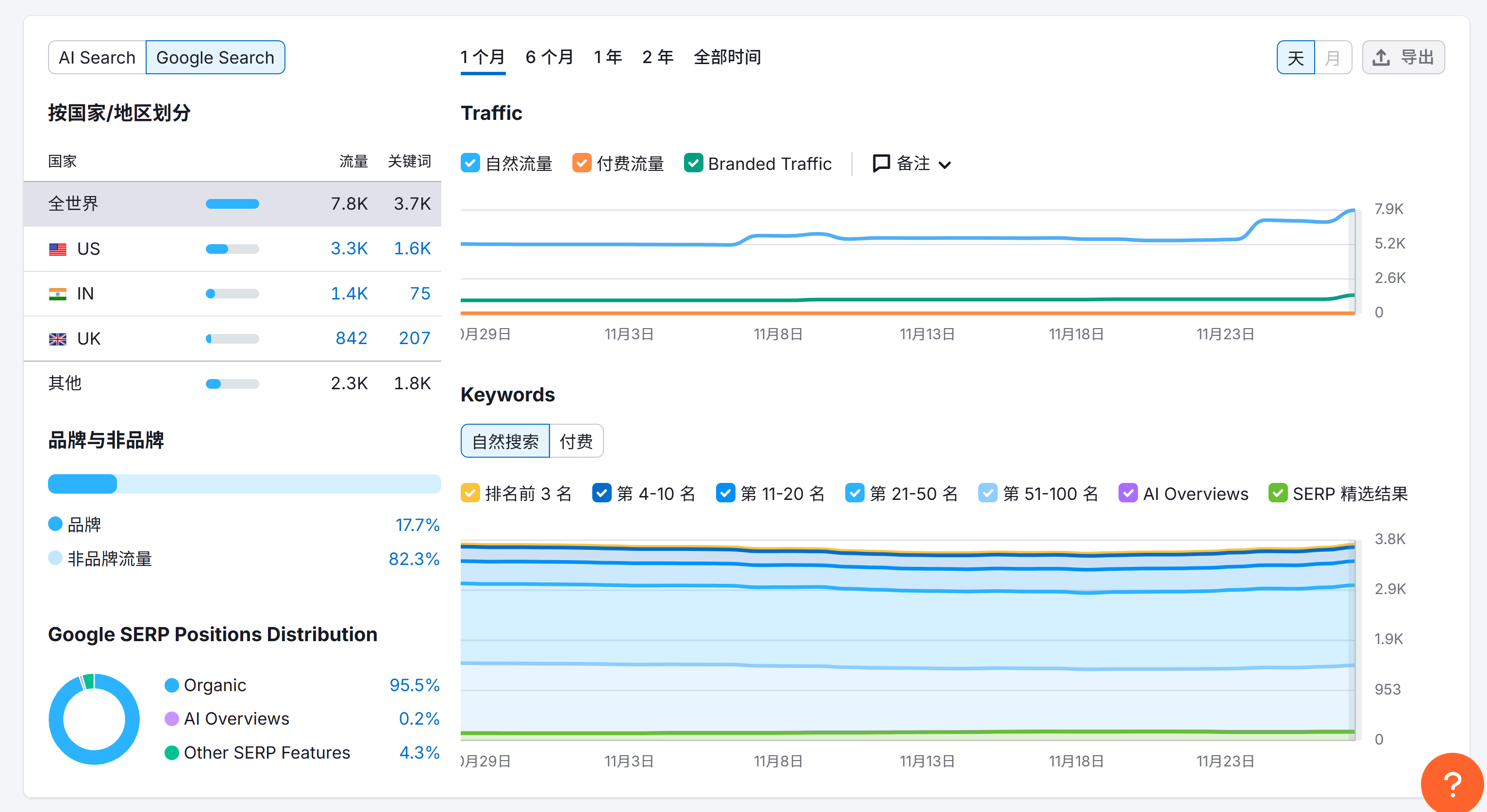
TemPolor is an AI music generation tool. Before collaboration, most of their organic traffic came from the brand term "TemPolor." After SEO optimization, most traffic gradually shifted to non-branded keywords related to product features, such as:

  • AI song generator
  • Lofi song maker
  • Similar songs AI
TemPolor Similarweb branded and non-branded traffic analysis: 68% non-branded traffic, 32% branded trafficTemPolor Semrush organic search traffic analysis: 17.7% branded traffic, 82.3% non-branded traffic

Case 2: Kling AI - Still Dominated by Branded Traffic

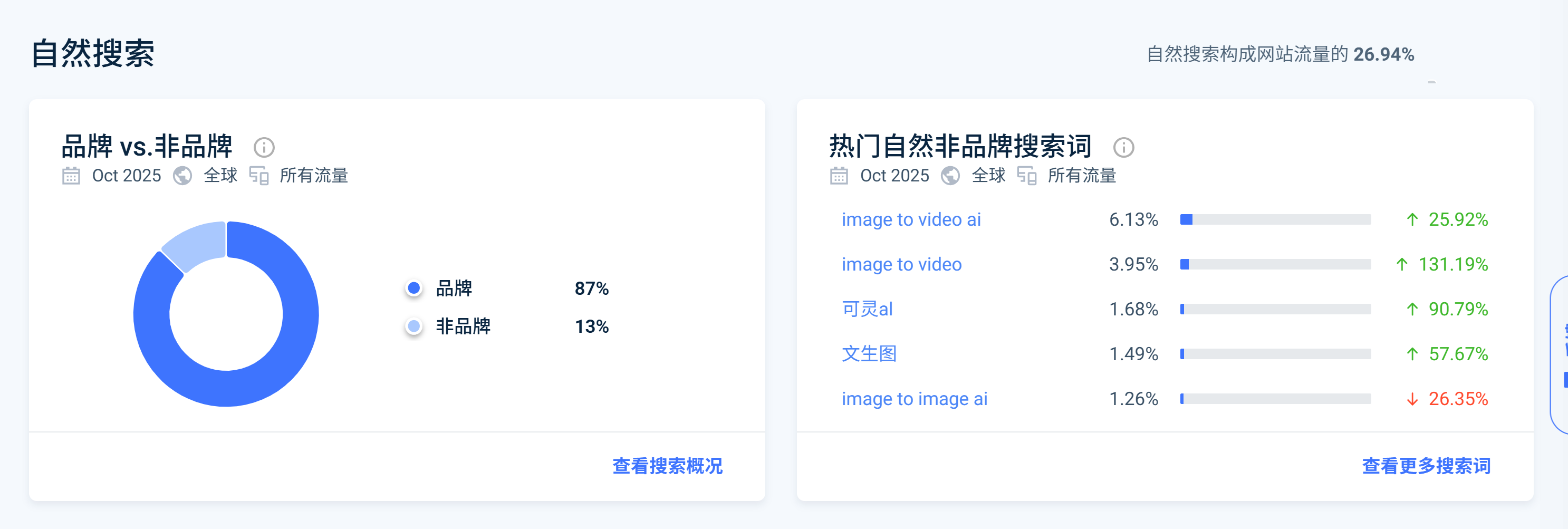
As a comparison, most of Kling AI's organic traffic still comes from brand-related queries such as "Kling" and "可灵AI." Although their total organic traffic volume may be large, the high proportion of branded traffic indicates there is still room for SEO strategy optimization.

Kling AI Similarweb branded and non-branded traffic analysis: 87% branded traffic, 13% non-branded traffic

Key Insight: As I mentioned in my Linkloud event sharing, high organic traffic does not mean good SEO. Being able to distinguish between branded and non-branded queries in organic traffic can help growth professionals better balance brand building and SEO strategies to achieve true organic growth.

How to Use the Branded Queries Filter?

The branded queries filter is located in Google Search Console's Performance report:

  1. Log in to Google Search Console
  2. Navigate to Performance → Search results
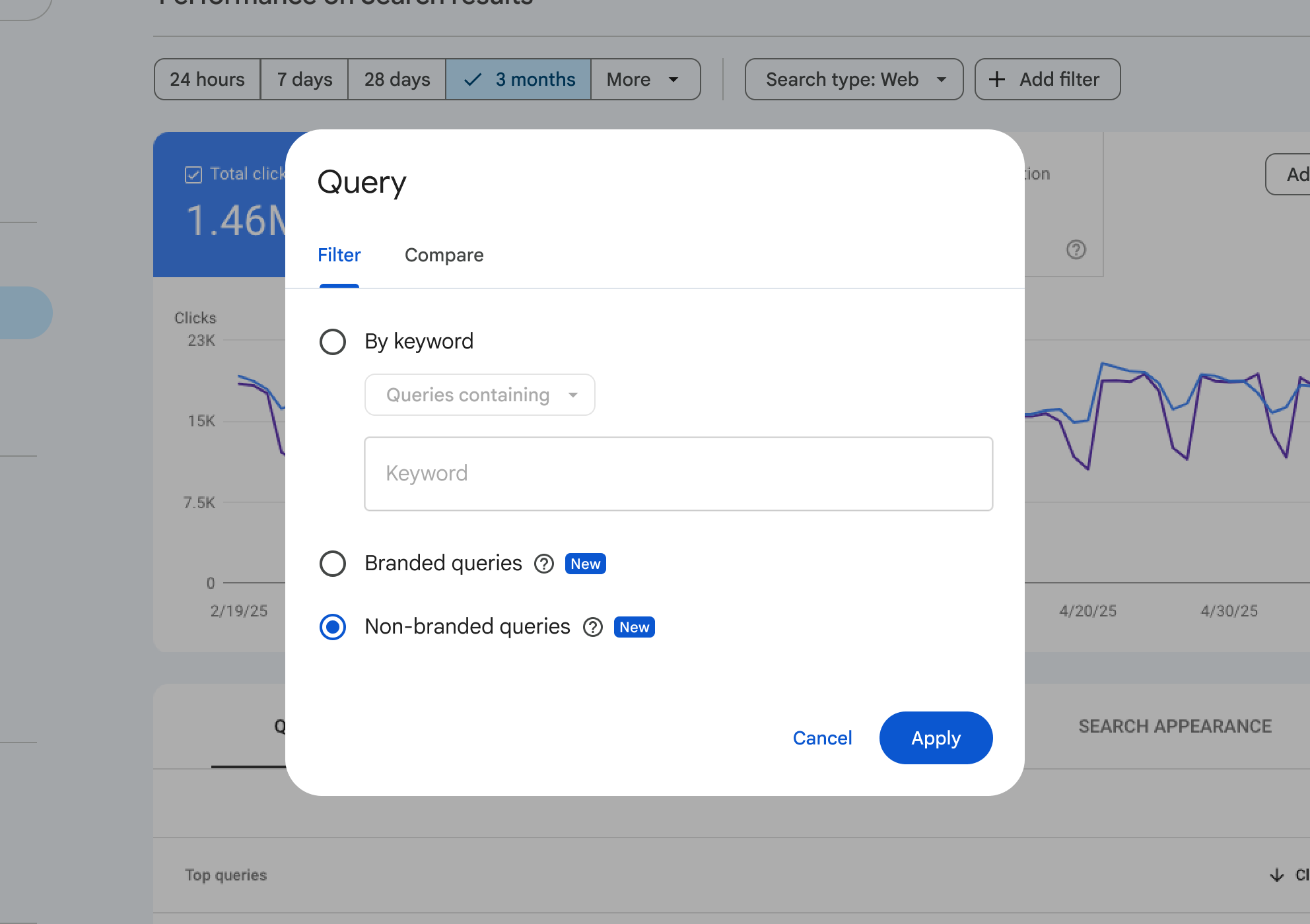
  3. Click "+ Add filter" and select "Query"
  4. In the Query filter, select "Branded queries" or "Non-branded queries"
Search Console Query filter dialog: Branded queries and non-branded queries options

Tip: This feature is being rolled out gradually and is only available for top-level domain properties, requiring sufficient query volume and impressions.

Branded Traffic Card in Insights Report

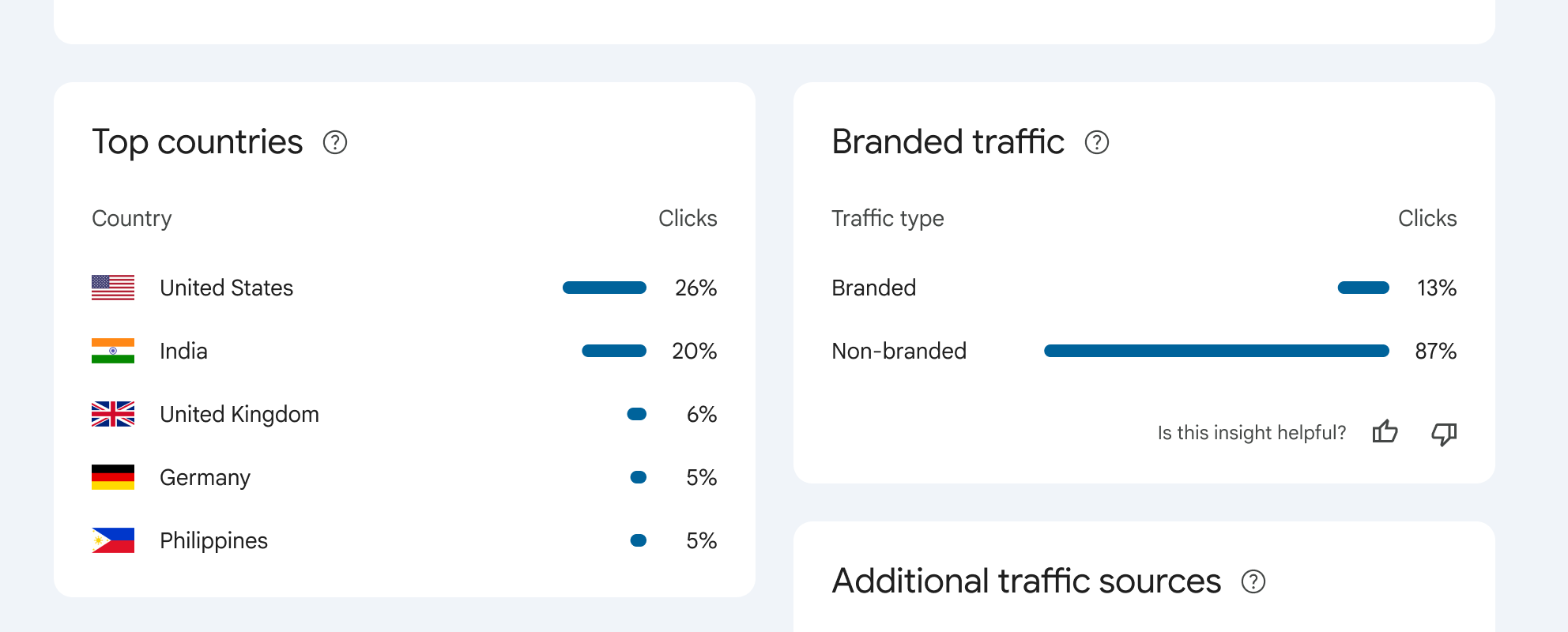
Google has added a branded traffic card in Search Console Insights reports to help you quickly understand the overall situation of branded and non-branded traffic.

Search Console Insights report: Branded traffic card showing 13% branded traffic, 87% non-branded traffic

This card displays the total click comparison between branded and non-branded queries, allowing you to quickly understand brand awareness without diving deep into the Performance report.

How Does Google Identify Branded Queries?

Google uses an AI-assisted system to identify branded queries, not simple keyword matching. The system identifies:

  • All language versions of brand names
  • Spelling errors and variants (e.g., "Gogle" will be identified as Google)
  • Brand-related products/services (e.g., searching for "Gmail" for google.com)
  • Query context and user intent

Important note: This filter is only for data analysis and does not affect Google search rankings. If you find queries incorrectly classified, you can inform Google through the feedback feature.

Practical Use Cases

Assess Brand Awareness

By analyzing the proportion and growth trends of branded queries, assess brand awareness in target markets. If the proportion of branded queries continues to rise, it indicates that brand marketing campaigns are effective.

Content Marketing Effectiveness Evaluation

The growth of non-branded queries reflects the effectiveness of content marketing and SEO strategies. Focus on click trends of non-branded queries, identify the best-performing non-branded keywords, and then create more related content. Understanding the characteristics of different traffic types helps better analyze the composition of organic traffic. For details, see Website Traffic Source Classification.

SEO Strategy Optimization

Analyze the rankings and click-through rates of branded and non-branded queries separately to develop more targeted SEO strategies. Ensure brand-related pages rank first in branded queries, optimize content for non-branded keywords, and use internal linking strategies to improve page authority.

Limitations and Considerations

  • Only available for top-level domain properties: Not available for URL path properties or subdomain properties
  • Requires sufficient query volume: The website needs sufficient query volume and impressions
  • Gradual rollout: This feature is being rolled out gradually and may not be available to all eligible websites yet
  • Identification accuracy: Due to the dynamic nature of brand identification, some queries may occasionally be misidentified
  • Does not affect search rankings: This filter is only for data analysis and does not affect Google search rankings

Conclusion

Branded-query filters in Search Console are a hygiene tool: they help you separate brand navigation from generic demand so you do not misread performance during campaigns or PR spikes.

Pair filtered views with URL-level checks and landing-page intent reviews—filters surface where to look, not why rankings moved.

Frequently Asked Questions

Why can't I see the branded queries filter?
The branded queries filter is being rolled out gradually and may not be available to all users yet. Additionally, this feature is only available for top-level domain properties (not for URL path properties like https://example.com/path or subdomain properties like developers.google.com), and requires sufficient query volume and impressions to display this feature.
Is branded query identification accurate?
Google uses an AI-assisted system to identify branded queries, not simple keyword matching. The system considers all language versions of brand names, spelling errors, variants, and queries that don't include the brand name but point to unique products or services. Due to the dynamic and contextual nature of brand identification, occasional misidentification may occur, but overall accuracy is high.
Will this feature affect my search rankings?
No. The branded queries filter is only for data analysis and reporting, and does not affect Google's search ranking algorithm. It is just a tool to help you better understand and analyze website traffic.
How to increase non-branded query traffic?
Create high-quality content for non-branded keywords, optimize existing content, build backlinks, use internal linking, focus on long-tail keywords and user intent matching.
What is the ideal ratio of branded to non-branded queries?
Varies by industry and stage. New brands may have higher non-branded share; mature brands typically higher branded. Ideal state: both balanced. Focus on trend changes rather than absolute ratios.
Can I export branded and non-branded query data?
Yes. In Search Console's Performance report, after applying the branded queries filter, you can click the export button in the top right corner to export the filtered data as CSV or Google Sheets format for further data analysis and reporting.
Where can I learn more about this topic?
Explore related guides on this site or check official documentation. Many resources offer free tutorials and best practices.
How do I get started as a beginner?
Start with free resources and basic tutorials. Practice with simple examples first, then gradually tackle more advanced use cases.

References

  1. Introducing the Branded queries filter in Search Console (Google Search Central Blog · 2025)Google Search Central官方博客:品牌查询过滤器功能介绍。
  2. Google Search Console adds branded queries filter (Search Engine Land · 2025)Search Engine Land关于品牌查询过滤器的报道。
  3. Google Search Console To Add Brand Query Filters (Search Engine Roundtable · 2025)Search Engine Roundtable关于品牌查询过滤器的讨论。
  4. AI-assisted brand query exclusion announcement (Daragh Nener-Lally · 2025)Daragh Nener-Lally在X上发布的AI辅助品牌查询排除功能公告。

    This site uses cookies and similar technologies for analytics, personalized ads (via Google AdSense), and essential functions. By clicking “Accept All”, you consent to our use of cookies. You can reject non-essential cookies by clicking “Reject All”.

    Privacy Policy

    Branded Queries Filter: Google Search Console | Alignify