What is a Branded Query?
A branded query is a search query that contains a brand name, brand variant, or brand-related products or services.
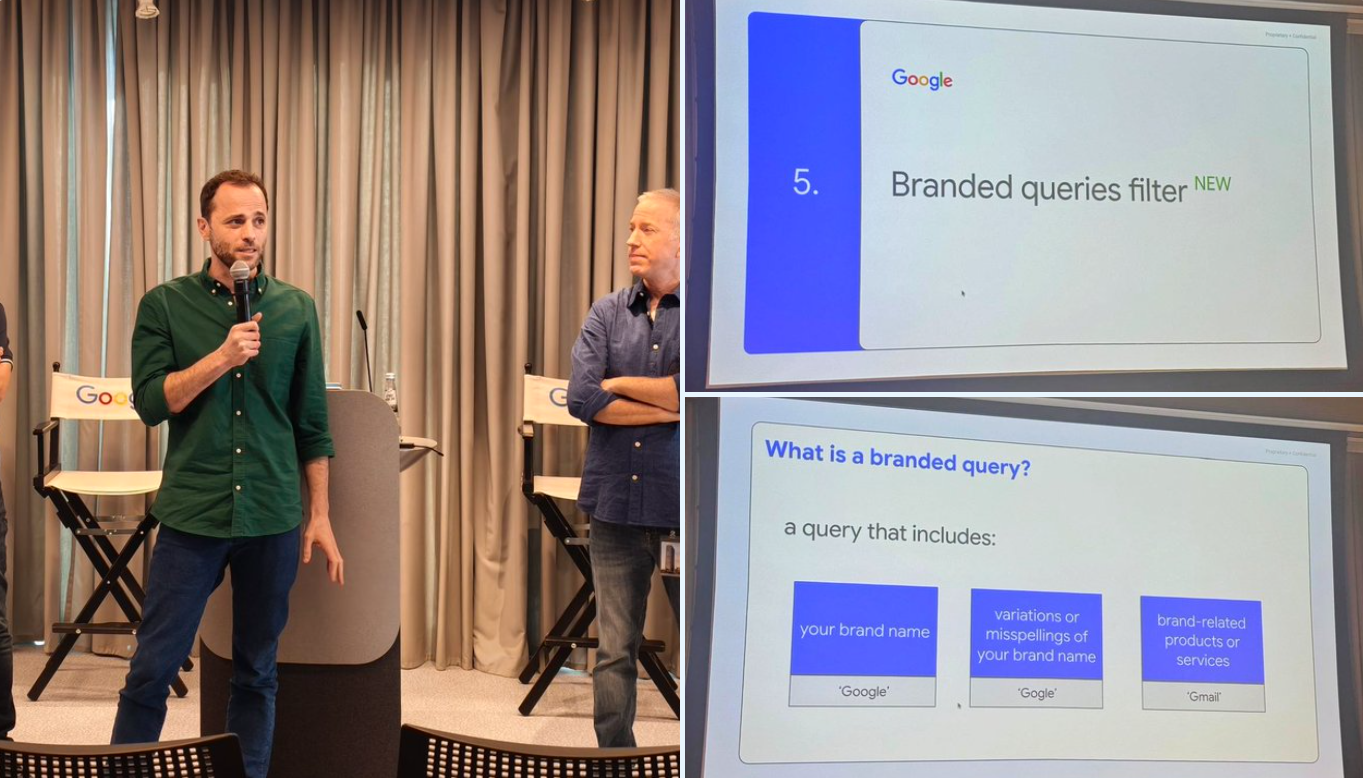
Three Types of Branded Queries:
- Brand Name: Queries directly containing the brand name, such as searching for "Google"
- Brand Variants or Spelling Errors: Queries containing brand name variants or common spelling errors, such as searching for "Gogle"
- Brand-Related Products or Services: Queries that don't directly include the brand name but point to unique products or services of that brand, such as searching for "Gmail" (for google.com)
Author's Note: Products are not always strongly associated with brands. For example, Nano Banana is an unofficial name for Google Gemini 2.5. Brand terms are not always brands and may generalize into generic functional terms. For example, Inpainting was originally a brand term for Dalle, but later generalized into the general term for the "AI inpainting replacement" feature, competing with "AI Replacer."
Why Separate Branded and Non-Branded Queries?
Characteristics of Branded Queries
- Higher rankings and click-through rates
- Users already have brand awareness
- Higher conversion rates
Characteristics of Non-Branded Queries
- Organic growth opportunities
- Content marketing effectiveness indicators
- Long-term growth potential
By analyzing these two query types separately, you can better evaluate brand awareness, content marketing effectiveness, and develop more targeted SEO strategies. For more classification and source analysis of website traffic, refer to the article on Website Traffic Source Classification.
Real Cases: Similarweb and Semrush Branded/Non-Branded Traffic Analysis
In addition to Google Search Console, Similarweb and Semrush also provide branded and non-branded traffic analysis features. By comparing the traffic composition of different products, we can more clearly see the differences in SEO strategies.
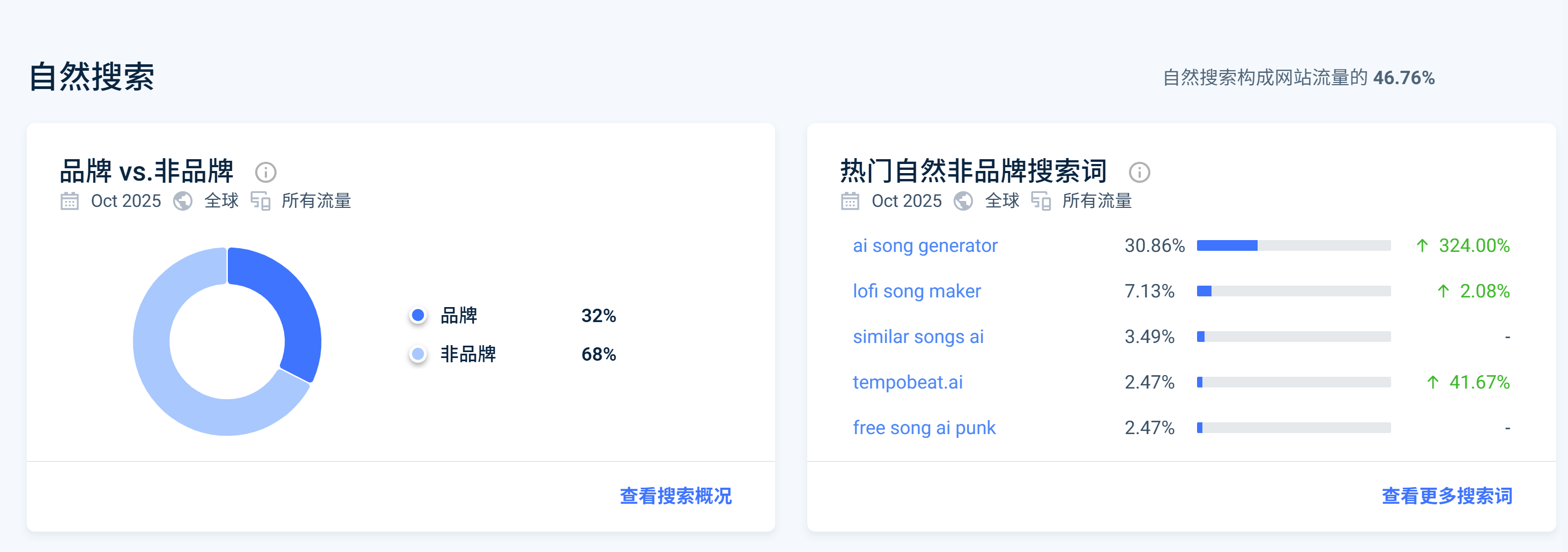
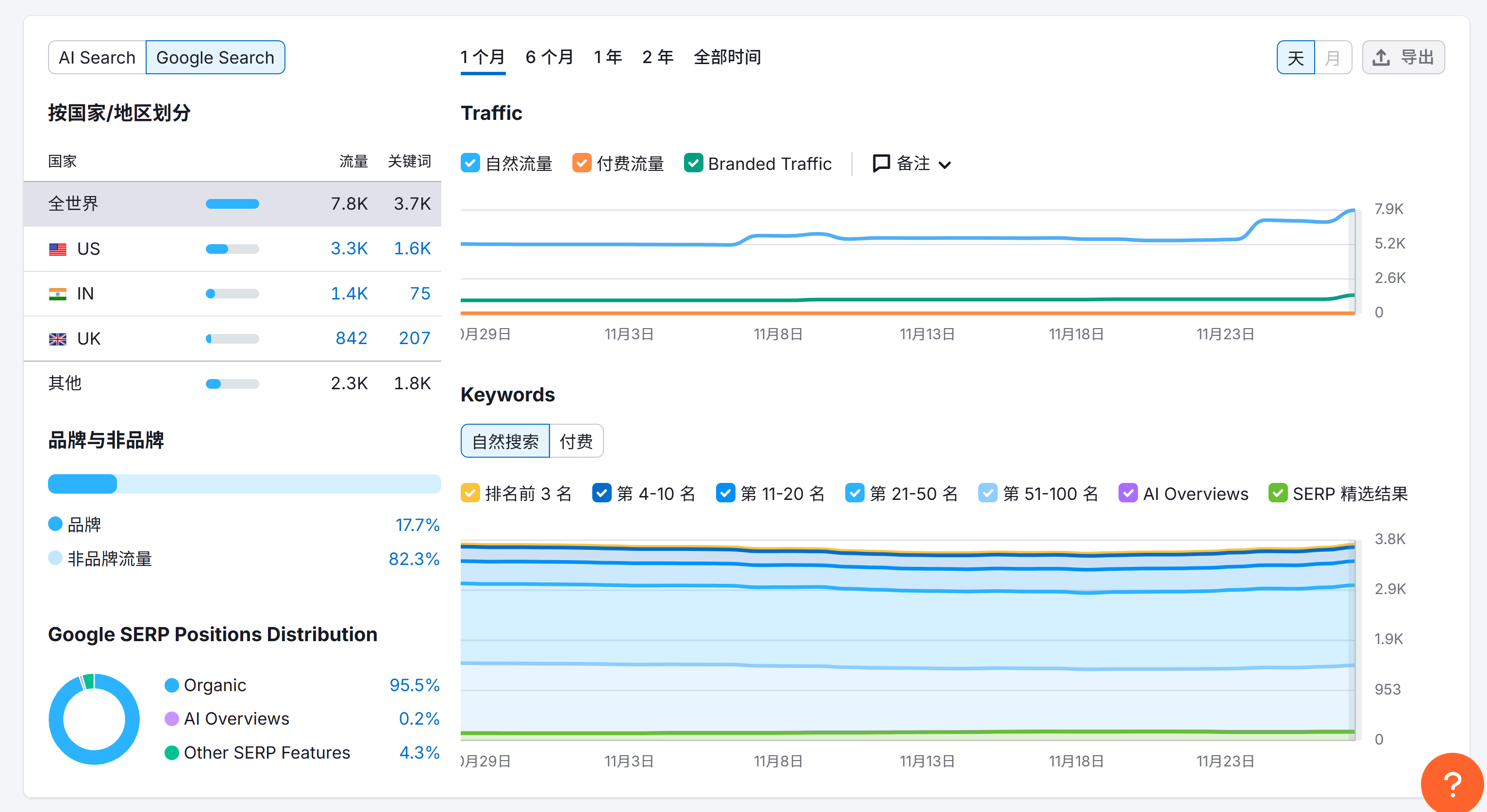
Case 1: TemPolor - Transitioning from Branded to Non-Branded Traffic
TemPolor is an AI music generation tool. Before collaboration, most of their organic traffic came from the brand term "TemPolor." After SEO optimization, most traffic gradually shifted to non-branded keywords related to product features, such as:
- AI song generator
- Lofi song maker
- Similar songs AI
Case 2: Kling AI - Still Dominated by Branded Traffic
As a comparison, most of Kling AI's organic traffic still comes from brand-related queries such as "Kling" and "可灵AI." Although their total organic traffic volume may be large, the high proportion of branded traffic indicates there is still room for SEO strategy optimization.
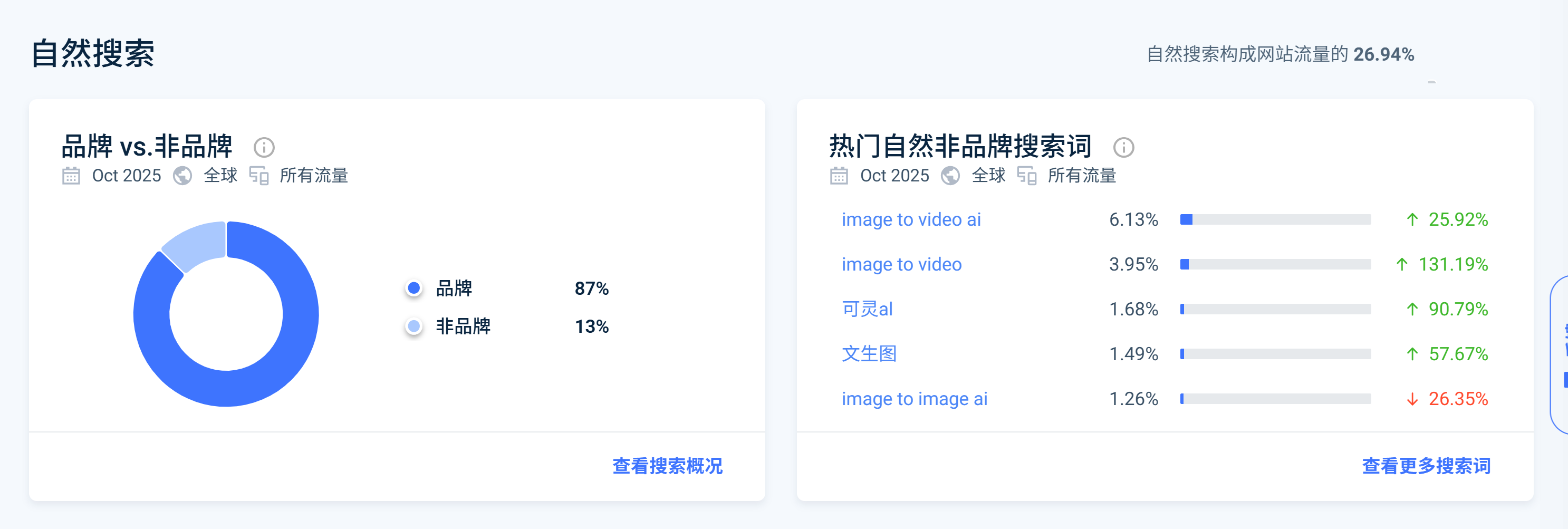
Key Insight: As I mentioned in my Linkloud event sharing, high organic traffic does not mean good SEO. Being able to distinguish between branded and non-branded queries in organic traffic can help growth professionals better balance brand building and SEO strategies to achieve true organic growth.
How to Use the Branded Queries Filter?
The branded queries filter is located in Google Search Console's Performance report:
- Log in to Google Search Console
- Navigate to Performance → Search results
- Click "+ Add filter" and select "Query"
- In the Query filter, select "Branded queries" or "Non-branded queries"
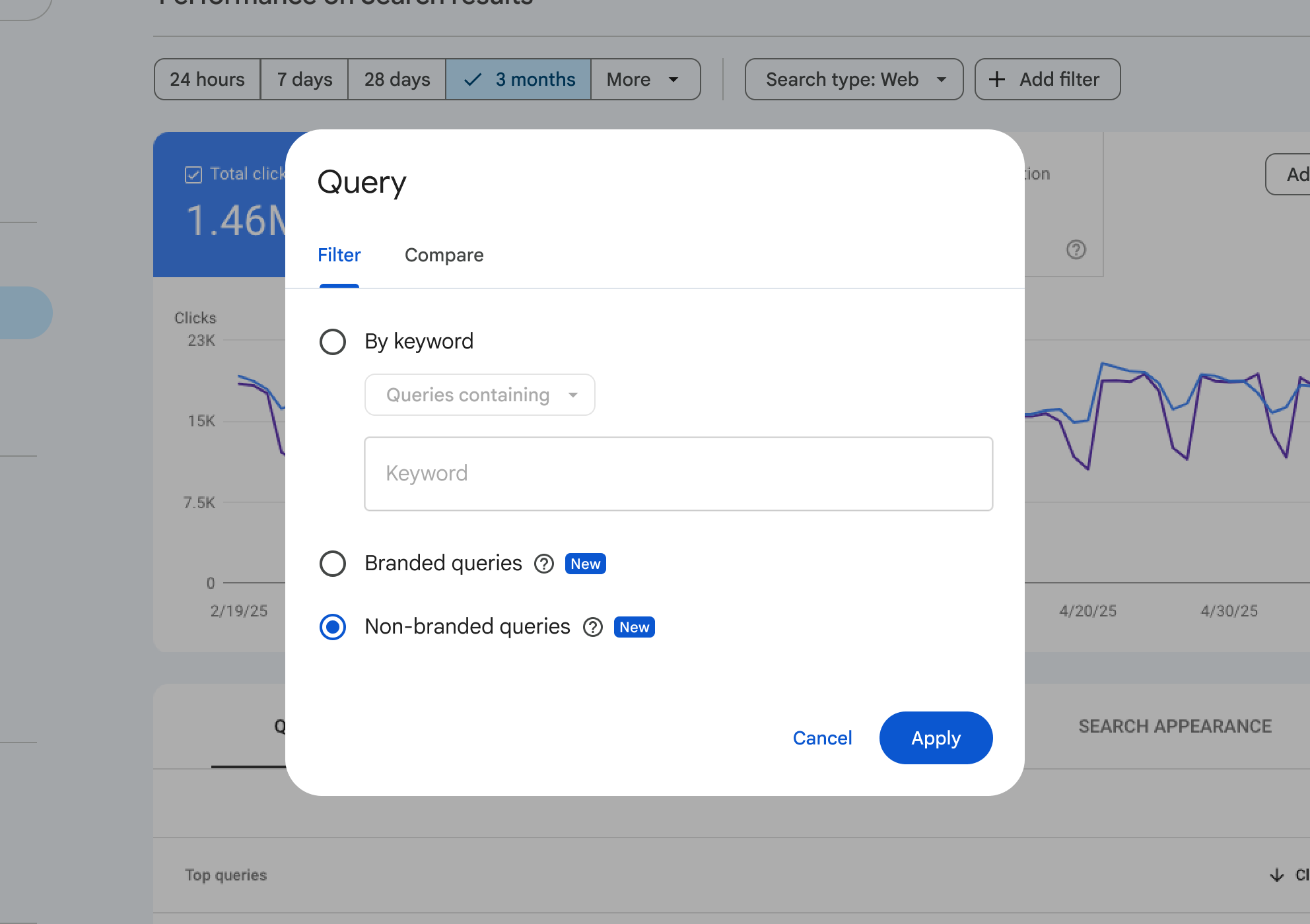
Tip: This feature is being rolled out gradually and is only available for top-level domain properties, requiring sufficient query volume and impressions.
Branded Traffic Card in Insights Report
Google has added a branded traffic card in Search Console Insights reports to help you quickly understand the overall situation of branded and non-branded traffic.
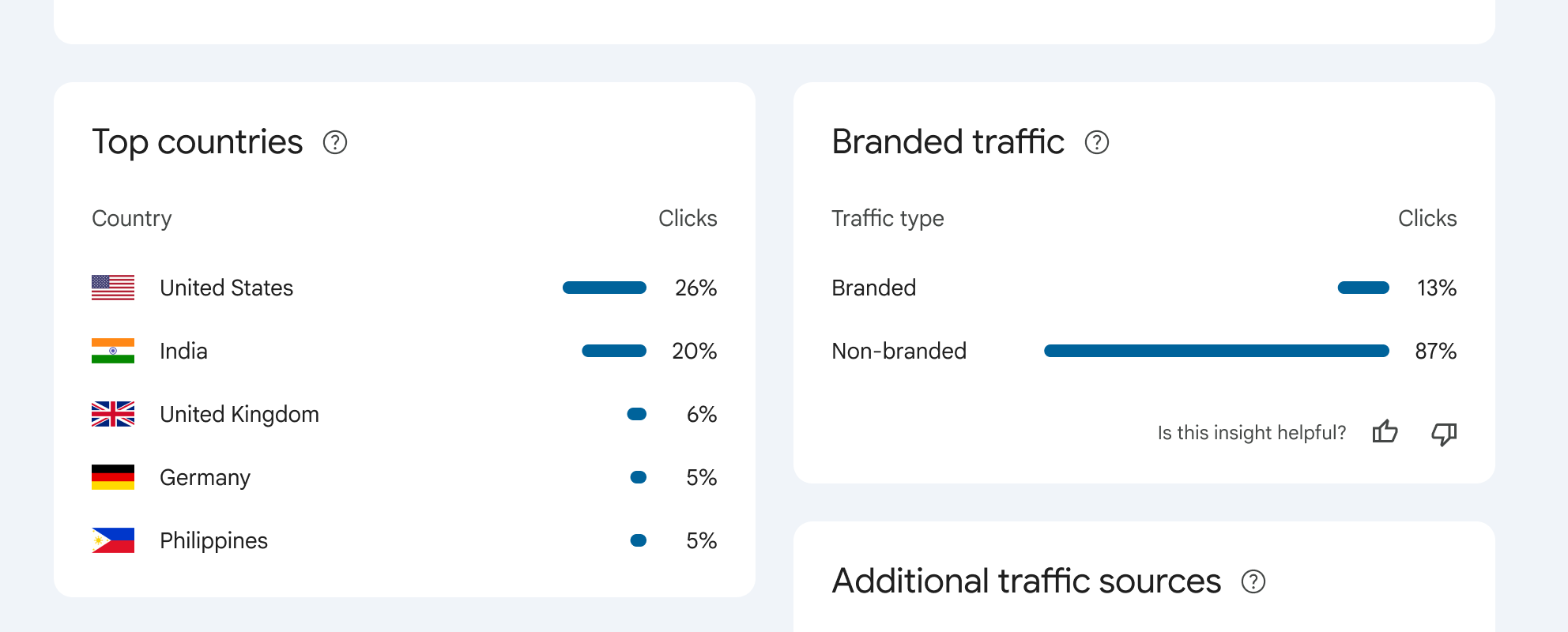
This card displays the total click comparison between branded and non-branded queries, allowing you to quickly understand brand awareness without diving deep into the Performance report.
How Does Google Identify Branded Queries?
Google uses an AI-assisted system to identify branded queries, not simple keyword matching. The system identifies:
- All language versions of brand names
- Spelling errors and variants (e.g., "Gogle" will be identified as Google)
- Brand-related products/services (e.g., searching for "Gmail" for google.com)
- Query context and user intent
Important Note: This filter is only for data analysis and does not affect Google search rankings. If you find queries incorrectly classified, you can inform Google through the feedback feature.
Practical Use Cases
Assess Brand Awareness
By analyzing the proportion and growth trends of branded queries, assess brand awareness in target markets. If the proportion of branded queries continues to rise, it indicates that brand marketing campaigns are effective.
Content Marketing Effectiveness Evaluation
The growth of non-branded queries reflects the effectiveness of content marketing and SEO strategies. Focus on click trends of non-branded queries, identify the best-performing non-branded keywords, and then create more related content. Understanding the characteristics of different traffic types helps better analyze the composition of organic traffic. For details, see Website Traffic Source Classification.
SEO Strategy Optimization
Analyze the rankings and click-through rates of branded and non-branded queries separately to develop more targeted SEO strategies. Ensure brand-related pages rank first in branded queries, optimize content for non-branded keywords, and use internal linking strategies to improve page authority.
Limitations and Considerations
- Only available for top-level domain properties: Not available for URL path properties or subdomain properties
- Requires sufficient query volume: The website needs sufficient query volume and impressions
- Gradual rollout: This feature is being rolled out gradually and may not be available to all eligible websites yet
- Identification accuracy: Due to the dynamic nature of brand identification, some queries may occasionally be misidentified
- Does not affect search rankings: This filter is only for data analysis and does not affect Google search rankings