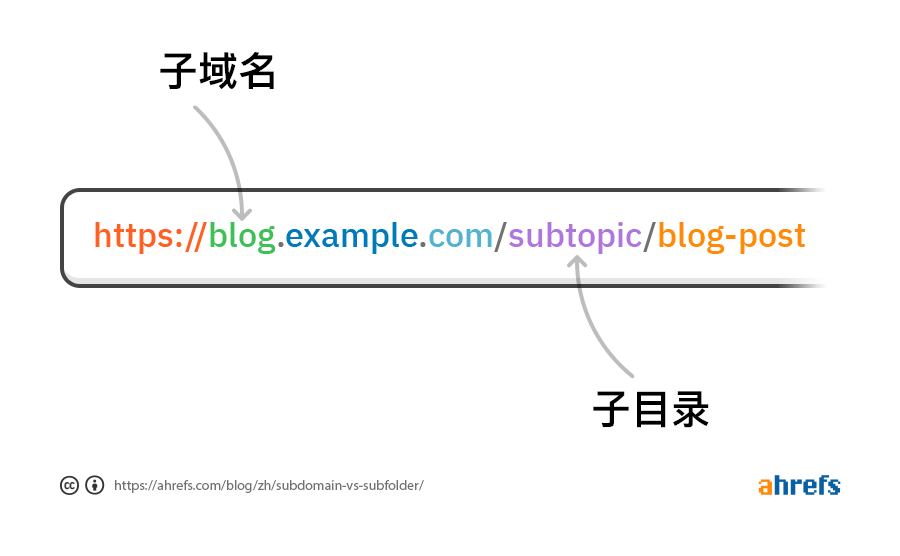
Subdomain vs Subdirectory: SEO Impact Comparison
Terminology Note: In this article, Subdirectory and Subfolder refer to the same concept, both representing hierarchical structures in URL paths (e.g., example.com/blog). These two terms are interchangeable in SEO and technical documentation, with different sources having different preferences: Subdirectory is more common in technical documentation and SEO industry (such as Semrush, Ahrefs), while Subfolder is more common in daily conversation and some platforms (such as Moz). This article uniformly uses the term \"Subdirectory\".
When deciding on website content deployment solutions, the two most common choices are: Subdomain and Subdirectory. Whether it's blogs, landing pages, technical documentation, or other content pages, the choice between subdomain vs subdirectory directly affects SEO performance, technical implementation, and maintenance costs. This article provides an in-depth comparison of SEO impact differences between these two solutions to help you make the right deployment decision.
From a technical perspective, Subdomain refers to forms like blog.example.com, which are treated as independent domains; while Subdirectory refers to forms like example.com/blog, which are part of the main domain. For detailed definitions of subdomains, you can refer to the SEO Glossary; for more information about website structure, you can refer to the article on Website Structure Optimization. This technical difference directly affects how search engines evaluate content.
Common subdomain examples include: blog.example.com, landing.example.com, news.example.com, shop.example.com, etc. Typical subdirectory forms are: example.com/blog, example.com/landing, example.com/news, example.com/shop, etc. Although they look similar in URL structure, search engines handle them completely differently.
| Comparison Dimension | Subdomain (blog.example.com) | Subdirectory (example.com/blog) |
|---|---|---|
| SEO Authority Inheritance | Not inherited, needs independent establishment | Automatically inherits main domain authority |
| Google Evaluation Method | Treated as independent domain | Counted in main domain's overall evaluation |
| Internal Link Authority Transfer | Cross-domain, weaker authority transfer | Within same domain, direct authority transfer |
| Technical Implementation Complexity | Requires DNS configuration, relatively complex | Path configuration, relatively simple |
| Applicable Scenarios | Independent brand, different languages, technical limitations | Content marketing, SEO-driven, unified brand |
SEO Impact Analysis
Google and other search engines handle subdomains and subdirectories differently, which directly affects SEO effectiveness. Understanding these differences is crucial for making the right deployment decision.
Subdirectories have significant SEO advantages. First, subdirectories automatically inherit all SEO authority and backlink weight from the main domain, meaning you don't need to build SEO authority from scratch. Second, Google counts subdirectory content in the main domain's overall evaluation, which helps improve overall rankings. Third, internal links between the main site and blog transfer authority more directly because they're under the same domain. Finally, you only need to manage SEO strategy and configuration for one domain, greatly simplifying management work.
In contrast, subdomains have different SEO characteristics. Google treats subdomains as independent domains, meaning you need to build SEO authority from scratch. The main domain's authority doesn't automatically transfer to subdomains, and you need to separately build backlinks and optimization strategies for subdomains. However, if blog content is completely different from the main site (e.g., different language, different brand), subdomains may be more appropriate as they allow you to establish independent brand identity and SEO strategy.
Real-world case comparisons can better illustrate the differences between these two solutions. Successful cases using subdirectories include: HubSpot (hubspot.com/marketing/blog, excellent SEO performance), Moz (moz.com/blog, significant content marketing effectiveness), Ahrefs (ahrefs.com/blog, continuous organic traffic growth). These companies all achieved excellent SEO performance through subdirectory solutions. For more information on how to optimize website structure to improve SEO effectiveness, you can refer to relevant guides.
Cases using subdomains usually have special reasons: Google uses developers.google.com as a technical documentation site because it needs independent branding; GitHub uses github.blog as an independent content platform; Shopify uses partners.shopify.com to distinguish different business lines. These cases show that subdomains are more suitable for scenarios requiring completely independent brands or business lines.
When to Use Subdomain
Although subdirectories are usually more beneficial for SEO, in certain specific situations, subdomains may be a better choice:
1. Completely Different Brand or Business Line
If the blog or landing page represents a completely independent brand or business, subdomains can help establish independent brand identity. For example, an e-commerce platform might use blog.shop.com to distinguish the main site from content marketing, or use landing.product.com to showcase independent product landing pages. Large tech companies like Google also use different deployment strategies for their different product lines, with each product having independent brand positioning and functionality.
Below is a comparison of deployment methods for Google's main products:
| Product Category | Product Name | URL | Deployment Method |
|---|---|---|---|
| Core Products | Search | google.com | Main Domain |
| Gmail | mail.google.com | Subdomain | |
| YouTube | youtube.com | Independent Domain | |
| Google Drive | drive.google.com | Subdomain | |
| Google Maps | maps.google.com | Subdomain | |
| Google Chrome | google.com/chrome | Subdirectory | |
| Other Popular Products | Google Docs | docs.google.com | Subdomain |
| Google Calendar | calendar.google.com | Subdomain | |
| Google Photos | photos.google.com | Subdomain | |
| Google Translate | translate.google.com | Subdomain | |
| Google Assistant | assistant.google.com | Subdomain | |
| Google Cloud | cloud.google.com/products | Subdomain |
From the table, we can see that most of Google's products use subdomain deployment, because each product has independent brand positioning, functional characteristics, and technical architecture. This deployment method allows each product team to independently manage their own SEO strategy and user experience while maintaining association with Google's main brand.
2. Technical Documentation and Status Pages
Technical documentation (docs.example.com) and service status pages (status.example.com) usually use subdomains. These pages require independent management and maintenance, and their content types differ from the main site. Using subdomains can better organize and manage these special-purpose pages.
Similar scenarios also include: When integrating third-party SaaS services, such as forums built with Discourse (forum.example.com), or communities and help centers built with other third-party platforms; API landing pages and developer platforms also often use subdomains, for example using platform.example.com instead of example.com/api, which can better organize API documentation, developer tools, and platform resources while maintaining independence from the main site.
Additionally, many websites' product interfaces and dashboards also use subdomains, such as app.example.com or dash.example.com. This deployment method can separate application interfaces from marketing websites, providing better user experience and technical architecture. Application interfaces typically require login authentication, real-time data updates, complex interactive features, etc., while marketing websites focus on content display and SEO optimization. Using subdomains allows both to serve their purposes without interference.
3. Multilingual Websites
Although using subdirectories with hreflang tags is usually a better solution, in some cases using subdomains (such as blog-cn.example.com, landing-us.example.com) can better organize multilingual content. For example, companies like Wondershare use subdomains to organize different language versions of blogs and landing pages. However, a better solution is usually to use subdirectories with hreflang tags, which maintains SEO advantages while correctly conveying language and region information to search engines.
4. Programmatic SEO Pages
When you need to create a large number of programmatically generated SEO pages (such as product landing pages, category pages), using subdomains can isolate this content and prevent negative impacts on the main domain's SEO performance. If programmatically generated content quality is low or risky, using subdomains can protect the main domain's reputation and rankings. For example, some e-commerce websites use subdomains for product catalog pages or batch-generated landing pages.
5. Technical Limitations
Some CMS platforms (such as WordPress.com) may only support subdomain deployment. In this case, you can consider using reverse proxy to proxy subdomain content to the main domain's subdirectory.
6. Independent Technology Stack
If blogs or landing pages need to use completely different technology stacks (e.g., main site is PHP, content pages are Node.js) and cannot be unified through reverse proxy, subdomains may be the only option.
7. Testing and Development Environments
Testing environments, development environments, and pre-release environments usually use subdomains, such as beta.example.com, staging.example.com, dev.example.com, test.example.com, etc. These environments are for development and testing and should not be indexed by search engines.
When to Use Subdirectory
In most cases, subdirectories are the better choice, especially when your goal is to maximize SEO effectiveness. According to Google's official recommendations and numerous SEO case studies, subdirectories are usually the preferred solution for blog deployment unless there are clear business or technical reasons to use subdomains.
The following scenarios are particularly suitable for using subdirectories:
- Content Marketing Blogs and Landing Pages: When blog content or product landing pages are related to the main site's business and used to attract potential customers, subdirectories allow this content to directly contribute to the main site's SEO performance. Through reasonable internal linking strategies, you can further improve content page SEO effectiveness.
- SEO-Driven Content: If you hope to improve the main site's overall SEO performance through blog content or landing pages, subdirectories are the best choice because all content will be counted in the main domain's SEO evaluation.
- Unified Brand Image: When you want blogs, landing pages, and the main site to maintain consistent brand experience, subdirectories ensure users feel a unified brand image.
- Resource Sharing: If you want blogs or landing pages to leverage the main site's existing SEO authority and backlinks, subdirectories allow these pages to immediately gain these advantages.
- Simplified Management: When you want to uniformly manage SEO strategies for the main site, blogs, and landing pages, subdirectories can greatly simplify management work because you only need to manage SEO configuration for one domain. For more information about website structure optimization, you can refer to relevant guides.
Technical Implementation Solutions
There are multiple technical solutions for implementing subdirectory blogs, and you can choose the most suitable solution based on your technology stack, team skills, and budget. Regardless of which solution you choose, you need to ensure content can be correctly indexed by search engines. For more information about website indexing optimization, you can refer to relevant guides.
Building Subdirectory Content Pages with Frontend Frameworks
Modern frontend frameworks (such as Next.js, Nuxt.js, Gatsby, Remix) all support Server-Side Rendering (SSR) or Static Site Generation (SSG), which can generate fully SEO-friendly HTML. Taking Next.js as an example, creating subdirectory blogs or landing pages is very simple. You just need to create page files in the app/blog or app/landing directory, and Next.js will automatically handle routing. If using static generation (SSG), Next.js will generate HTML for all pages at build time, ensuring search engines can fully crawl content. For detailed documentation on Next.js routing, you can refer to the Next.js Official Routing Documentation.
Advantages of using frontend frameworks to build subdirectory blogs and landing pages include: complete customization of SEO optimization (including meta tags, structured data, sitemap, etc.), static generation (SSG) can provide extremely fast loading speeds, generated HTML fully meets search engine requirements, and can be easily integrated into existing projects. Below is a Next.js implementation example:
// app/blog/page.tsx
import { Metadata } from "next";
import BlogLayout from "@/components/BlogLayout";

export const metadata: Metadata = {
  title: "Blog | Company Name",
  description: "Company blog content",
};

export default function BlogPage() {
  return <BlogLayout />;
}

// app/blog/[slug]/page.tsx
export async function generateStaticParams() {
  const posts = await getBlogPosts();
  return posts.map((post) => ({
    slug: post.slug,
  }));
}

export default async function BlogPost({ params }) {
  const post = await getBlogPost(params.slug);
  return <BlogPostLayout post={post} />;
}
Important Note: If using pure Client-Side Rendering (CSR), search engines may not be able to correctly crawl content. Ensure you use SSR or SSG mode to guarantee SEO effectiveness.
CMS Integration Solutions
If you want to use CMS to manage blog content while maintaining subdirectory SEO advantages, there are several solutions:
- Headless CMS: Use headless CMS (such as Strapi, Contentful, Sanity, Prismic) to manage content, fetch content via API and render in frontend frameworks. Recommended solution combinations include: Strapi + Next.js (self-hosted, full control), Contentful + Next.js (hosted service, easy to use), Sanity + Next.js (real-time collaboration, powerful queries). The advantage of this solution is separation of content and presentation, allowing flexible choice of frontend technology stack.
- WordPress Headless: Use WordPress as a content management system, fetch blog articles or landing page content through WordPress REST API or GraphQL, and render in frontend frameworks. This solution retains WordPress's powerful content management features while gaining modern frontend framework performance and SEO advantages. If you want to install WordPress in a subdirectory (e.g.,
example.com/wordpress) but serve the website from the root directory (example.com), you can refer to the WordPress Official Documentation. This method allows WordPress files to be stored in a subdirectory while keeping the website's URL structure clean, which is beneficial for SEO. Below is example code using WordPress REST API:// Using WordPress REST API const response = await fetch('https://your-wordpress.com/wp-json/wp/v2/posts'); const posts = await response.json(); // Rendering in Next.js export default function BlogPage({ posts }) { return ( <div> {posts.map(post => ( <article key={post.id}> <h2>{post.title.rendered}</h2> <div dangerouslySetInnerHTML={{ __html: post.content.rendered }} /> </article> ))} </div> ); } - Static CMS (Git-based CMS): Use Git-based CMS (such as Forestry, Netlify CMS, Tina CMS) to manage Markdown files, publish blog articles or landing page content through Git workflows. Advantages of this solution include: content stored in Git repositories with complete version control, can generate completely static websites with excellent performance, suitable for technical teams with simple development workflows.
- Visual Website Builder Reverse Proxy: For users using visual website builders like Framer or Webflow, you can integrate blog or landing page content into the main site's subdirectory through reverse proxy. Reverse proxy allows your server to directly request and cache pages from Framer sites, and can modify pages before serving content (such as setting HTTP security headers, adding authentication, etc.). This method supports custom routes, domains, SSL certificates, and can add additional caching layers to improve performance and reliability. For detailed configuration methods of Framer reverse proxy, you can refer to the Framer Reverse Proxy Hosting Documentation.
Reverse Proxy Solutions
If you already have an existing blog system (such as WordPress, Ghost) but want to present it in subdirectory form, you can use reverse proxy solutions.
Reverse proxy solutions are suitable for scenarios where you already have existing blog systems or landing page systems (such as WordPress, Ghost) but want to present them in subdirectory form. Below are several common reverse proxy configuration methods:
1. Nginx Reverse Proxy Configuration: If you use Nginx as a web server, you can proxy WordPress blogs or landing pages to subdirectories through the following configuration. For detailed Nginx reverse proxy configuration, you can refer to the Nginx Proxy Module Documentation:
# /etc/nginx/sites-available/example.com
server {
    listen 80;
    server_name example.com;

    # Main site
    location / {
        proxy_pass http://localhost:3000;  # Next.js main site
        proxy_set_header Host $host;
        proxy_set_header X-Real-IP $remote_addr;
    }

    # Blog subdirectory
    location /blog {
        proxy_pass http://localhost:8080;  # WordPress blog
        proxy_set_header Host $host;
        proxy_set_header X-Real-IP $remote_addr;

        # Rewrite WordPress URL
        rewrite ^/blog(.*)$ /$1 break;
    }
}
2. Vercel/Netlify Rewrite Rules: If you use deployment platforms like Vercel or Netlify, you can implement reverse proxy through rewrite rules. Vercel's configuration is in the vercel.json file, and Netlify's configuration is in the netlify.toml file. For detailed Vercel configuration methods, you can refer to the Vercel Rewrite Rules Documentation; for Netlify configuration, you can refer to the Netlify Redirect Documentation.
// vercel.json
{
  "rewrites": [
    {
      "source": "/blog/:path*",
      "destination": "https://your-wordpress.com/:path*"
    }
  ]
}

// netlify.toml
[[redirects]]
  from = "/blog/*"
  to = "https://your-wordpress.com/:splat"
  status = 200
  force = true
3. Cloudflare Workers: If you use Cloudflare, you can implement edge computing reverse proxy through Workers. For detailed Cloudflare Workers documentation, you can refer to the Cloudflare Workers Documentation.
// cloudflare-worker.js
addEventListener('fetch', event => {
  event.respondWith(handleRequest(event.request));
});

async function handleRequest(request) {
  const url = new URL(request.url);

  if (url.pathname.startsWith('/blog')) {
    // Rewrite path and proxy to WordPress
    url.hostname = 'your-wordpress.com';
    url.pathname = url.pathname.replace('/blog', '');

    return fetch(url.toString(), request);
  }

  // Other requests forward to main site
  return fetch(request);
}
Important Note: When using reverse proxy, ensure WordPress or other CMS URL settings are correct to avoid resource loading errors (CSS, JS, images, etc.). This is equally important for both blogs and landing pages.
Best Practice Recommendations
Regardless of which technical solution you choose, following these best practices can help you maximize SEO effectiveness. These recommendations apply to blogs, landing pages, documentation sites, product pages, and various other scenarios.
- Unified URL Structure: Ensure blog and landing page URL structures are clear and consistent, for example:
example.com/blog/article-titleorexample.com/landing/product-name. Avoid complex nested paths. Simple URL structures are not only beneficial for SEO but also for user experience. - Optimize Internal Links: Add internal links pointing to relevant pages on the main site in blog articles and landing pages, and vice versa. This helps authority transfer and user experience. For more content on internal link optimization, you can refer to the article on Internal Link Optimization.
- Generate XML Sitemap: Ensure blog articles and landing pages are included in the main site's sitemap.xml, or create independent content sitemaps and reference them in the main site sitemap. This helps search engines better discover and index your content.
- Unified Brand Experience: Maintain consistent design style and navigation structure across blogs, landing pages, and the main site, providing a unified user experience. This is not only beneficial for brand building but also for user retention and conversion.
- Monitor SEO Performance: Use Google Search Console to monitor indexing status, search performance, and traffic data for blogs and landing pages. Regularly check for technical SEO issues and promptly fix any problems found.
- Migrate Existing Content: If you want to migrate existing subdomain blogs or landing pages to subdirectories, be sure to set up 301 redirects, update all internal links, and submit a new sitemap in Google Search Console. This ensures SEO authority transfers smoothly and avoids traffic loss.
References
- Semrush. "Subdomain vs Subdirectory: Which is Better for SEO?" https://www.semrush.com/blog/subdomain-vs-subdirectory/
- Moz. "Subdomain vs Subfolder: The SEO Impact." https://moz.com/learn/seo/subdomain-vs-subfolder
- Ahrefs. "Subdomain vs Subdirectory: Which is Better for SEO?" https://ahrefs.com/blog/subdomain-vs-subdirectory/