How Search Engines Work: Crawlers, Indexing & Ranking
Key Takeaways
This article keeps the beginner-friendly walkthrough (inverted index, Pull vs Push, personalization) while adding Search Central framing: Crawling → Indexing → Serving results, plus limits like “no pay for organic ranking” and indexed-but-not-shown cases. FAQ answers stay plain text per site rules.
- Engines combine a searchable index with programs that retrieve candidates and assemble SERPs; colloquial “ranking” usually refers to the serving stage, not a single formula parallel to crawling.
- Google documents three stages—Crawling, Indexing, Serving search results—and states organic ranking and crawl frequency are not for sale; meeting Search Essentials still does not guarantee crawl, index, or visibility for
- Practical layers: crawl rules vs index directives (robots.txt is not a replacement for noindex), rendering budgets for JS-heavy pages, and canonical clustering inside indexing.
- Business-model and personalization sections remain for context; deeper task guides are linked once each from the body.
Use Cursor / OpenClaw to optimize crawlability and fix indexing issues
npx skills add kostja94/marketing-skills --skill site-crawlability indexingSearch Engine Basics
Additional detail: a given query.
Search engines are searchable databases of web content, consisting of two core parts: search index (digital library storing webpage information) and search algorithms (computer programs matching results from the index). When users enter search queries, search engines use algorithms to find the most relevant results in the index and rank them by relevance. This process involves discovering pages, crawling content, building indexes, understanding queries, matching results, and ranking presentation through complex technical systems including web crawlers, indexers, retrievers, and ranking algorithms. For a task-oriented continuation, follow the paths in SEO learning resources.Every search engine aims to provide the most relevant and useful search results. Search engines gain market share by improving result quality, and user satisfaction directly affects competitiveness and commercial value. Google holds 91% global market share because its search results are more relevant than competitors.
Search engines have two result types: organic results (from search index, cannot be paid for) and paid results (from advertisers, can be paid for). Each click on paid results requires advertisers to pay search engines, known as pay-per-click (PPC) advertising. Larger market share means more users, more ad clicks, and higher revenue. Google's ad revenue accounts for over 80% of total revenue, and Bing contributes significant ad revenue to Microsoft. This business model motivates search engines to improve result quality, attract more users, and generate more ad revenue.
Official stages, limits, and “indexed but not shown”
Google Search Central describes three stages: Crawling, Indexing, and Serving search results. Everyday talk about “ranking” usually maps to matching, scoring, and assembling the SERP inside the serving stage—not a separate box next to crawling.
Google also states it does not charge money to crawl a site more often or to rank organic results higher (paid listings are separate). Even pages that follow Search Essentials are not guaranteed to be crawled, indexed, or shown for a particular query.
A frequent confusion: Search Console says a URL is indexed, yet you cannot find it for your head terms. That can be a serving issue (relevance, quality, safer-side signals) rather than “the crawler never came.” For report-by-report workflows, start with website indexing diagnostics; for how result modules differ, pair with SERP overview.
How Search Engines Build Index
Search engines build indexes through four steps: discovering URLs, crawling pages, processing and rendering content, and building indexes. Here's Google's simplified process:
URLs: Web Page Discovery
Everything starts with a known URL list. Google discovers new pages through: backlinks (if a known page links to a new page, Google can find it), sitemaps (site owners publish an XML sitemap to list important URLs), and URL submissions (site owners can request crawling of specific URLs in Google Search Console). Google maintains a very large web index. When someone links to a new page from a known page, crawlers can follow links to discover it. Sitemaps still help discovery and prioritization hints, but they work best alongside internal links, clean URLs, and healthy status codes.
Crawling: Web Page Crawling
Web crawlers (spiders or robots) are automated programs that discover and crawl web content. Google's crawler is Googlebot, Bing's is Bingbot. Crawlers continuously discover new pages by following hyperlinks. They start from seed URLs, access initial page lists, analyze content and extract hyperlinks, adding new links to the queue. Path-level crawl rules and common mistakes are covered in our robots.txt guide; sites still express crawl preferences through robots.txt for many paths. They use breadth-first (BFS) or depth-first (DFS) strategies to balance efficiency and coverage. Modern crawler systems handle crawl rate control, URL deduplication, dynamic content rendering (JavaScript), and crawl priority.
Beyond Googlebot/Bingbot, AI crawlers (for example GPTBot or ClaudeBot) differ in goals and access policies. For a deeper comparison and controls, read the crawler guide.
Processing and Rendering
Processing is where Google understands and extracts key information. Rendering runs page code to approximate what users see and to extract links for later stages. Search Central describes rendering with a recent Chrome-class environment executing JavaScript; engineering tradeoffs with first-byte HTML and SSR/CSR are summarized in rendering and crawl notes.
Google processes HTML, CSS, JavaScript, images, and videos. For JS-heavy pages, render queues and resource budgets can still create instability—avoid putting the only copy of public content behind heavy client-only interactions.
Indexing: Building Search Library
Indexers parse raw web content crawled by crawlers into structured data, extracting keywords, metadata, and content features, and building database structures like inverted indexes for fast retrieval. Indexers parse HTML documents, extracting titles, body text, links, image alt text, and metadata. They perform natural language processing: word segmentation, stop word removal, and stemming. Finally, they build inverted indexes, mapping each keyword to all pages containing it, so search engines can quickly find relevant pages when users search.
Search indexes are what users search when using search engines. AI assistants like ChatGPT, Claude, and Gemini also use search indexes to find web pages. This is why being indexed in major search engines like Google and Bing is important. Users can't find you unless you're in the index.
When multiple URLs show near-duplicate content, indexing clusters them and selects a canonical representative; noisy signals here break both inclusion and serving. Shape parameters and duplicates in URL optimization.
Large-scale indexes handle updates, compression, and distributed storage; headline scale numbers change over time—triage with Search Console, logs, and reproducible checks rather than treating any diagram as ground truth.
Push Indexing vs Pull Indexing
Search engine indexing methods are divided into Push and Pull indexing. Understanding the differences and use cases helps choose the best indexing strategy. Pull indexing is like "search engines actively come to you," while Push indexing is like "you actively tell search engines about new content."
Pull Indexing (Crawling) is the traditional method where search engine crawlers (like Googlebot, Bingbot) periodically visit websites, follow links, and crawl content to build indexes. This is like "search engines actively come to you"—crawlers regularly "visit" your website to discover new content. Pull indexing suits static or low-update-frequency content like blog posts, FAQ pages, and evergreen content, but discovery speed is slower, potentially taking days or weeks.
Push Indexing (Notification) is the modern method where websites actively notify search engines of URL changes through APIs or protocols (like IndexNow), enabling real-time updates. This is like "you actively tell search engines about new content"—when your website has new or updated content, you proactively "notify" search engines rather than waiting for discovery. Push indexing offers fast discovery, immediately notifying search engines of URL changes, ideal for real-time content like e-commerce products, news, and dynamic content.
Best practice is a hybrid approach: use Push indexing for critical, fresh content (like newly published articles, updated product pages) through IndexNow or Indexing APIs for fast notifications; use Pull indexing for basic, low-update-frequency pages (like About pages, privacy policies) relying on traditional crawling. This hybrid approach ensures fast indexing for important content while leveraging search engines' automatic discovery capabilities for comprehensive coverage. For specific indexing tool usage, see our Search Indexing Tools guide.
Architecture diagram (reference)
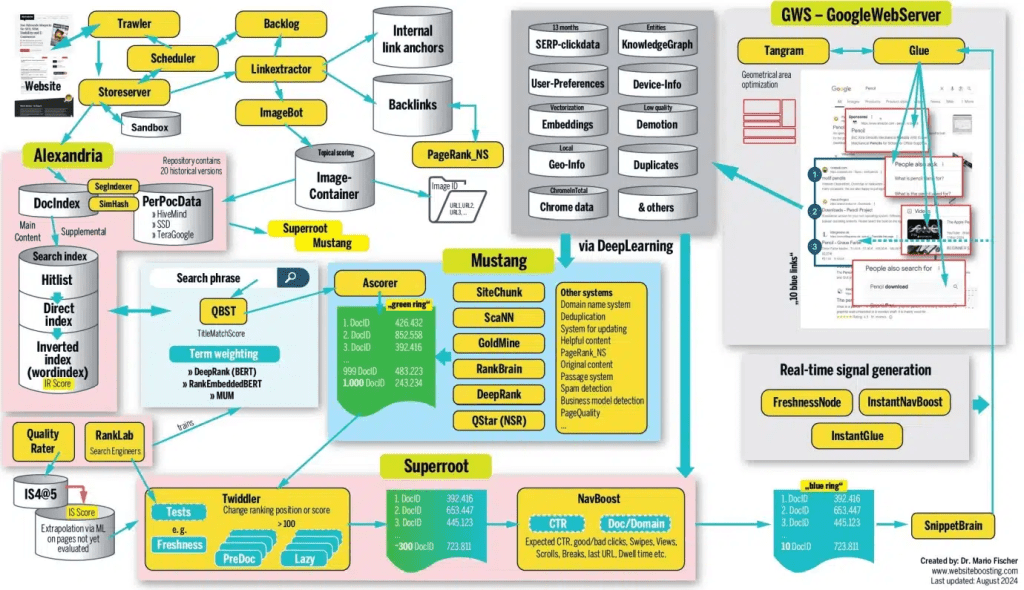
Internal codenames that appear in third-party client libraries (for example Trawler) are not the same as Google’s public system specifications. Treat Search Central and the Search Status dashboard as authoritative for behavior and limits; the diagram is intuition-only.
How Search Engines Rank Pages
During Serving search results, systems score candidates and assemble SERPs; the factors below are widely discussed in public guidance and practitioner reviews—treat them as relevance and UX levers, not a checklist to spam.
What are Search Algorithms
Search algorithms are combinations of programs and signals that retrieve candidates and order them. Public docs describe multiple ranking systems (link analysis, neural matching, spam defenses, etc.); names explain capabilities, not dials you can tweak independently.
Key Ranking Factors
No one knows every weight, but the factors below show up often in Google guidance and practitioner postmortems—treat them as quality and relevance levers, not a checklist to spam.
Backlinks
Backlinks are links from one website to another. They're one of Google's strongest ranking factors. This is why we see strong correlation between linking domains and organic traffic in studies of over a billion pages. Quality matters more than quantity. Pages with a few high-quality backlinks often outrank those with many low-quality ones. High-quality backlinks come from authoritative sites, relevant topic sites, and naturally earned links (not purchased or exchanged). For a structured playbook, see link building.
Relevance
Relevance is how useful a result is for the searcher. Google determines this in multiple ways. At the basic level, it looks for pages containing the same keywords as the search query. It also checks interaction data to see if others found the result useful. Relevance includes keyword matching, semantic relevance, topic relevance, and user intent matching. Google uses machine learning models like BERT to better understand query intent and content semantics, improving search result relevance. For controllable snippets and titles, pair with meta tags and SERP presentation.
Freshness
Freshness is a query-dependent ranking factor. It's stronger for searches needing fresh results. This is why you see recently published top results for “new Netflix series“ but not for "how to solve a Rubik's cube.“ Freshness is important for time-sensitive queries like news, events, and product launches. For "how-to" queries and definition queries, content quality and authority matter more than freshness.
Page Speed
Page speed is a ranking factor on desktop and mobile. It's more of a negative factor than positive, negatively affecting the slowest pages rather than positively affecting fast ones. Page speed affects user experience. Slow-loading pages increase bounce rates and reduce dwell time. Google uses Core Web Vitals such as LCP, INP, and CLS; INP has largely superseded the older FID framing—treat thresholds as documentation + measurement driven.
Mobile-Friendliness
Mobile-friendliness has been a ranking factor on mobile and desktop since Google's switch to mobile-first indexing in 2019. This means Google primarily uses the mobile version of pages for indexing and ranking. Mobile-friendliness includes responsive design, touch-friendly interfaces, fast loading speeds, and readable font sizes. Pages that don't meet mobile-friendly standards are affected in mobile search rankings.
How Search Engines Personalize Results
Google tailors search results for each user using location, language, and search history. Let's examine these factors:
Location
Google uses your location to personalize results with local intent. This is why all results for "Italian restaurant" are from or about local restaurants. Google knows you're unlikely to fly halfway around the world for lunch. For local search queries, Google prioritizes nearby businesses and services. Location information comes from user IP addresses, GPS data (mobile devices), and Google account settings.
Language
Google knows showing English results to Spanish users makes no sense. This is why it ranks localized content versions (if available) to users speaking different languages. Google determines which language results to show based on browser language settings, Google account language preferences, and search query language. For multilingual websites, Google tries to show versions matching the user's language. Routing and domain choices should stay aligned with business goals—see subdomain vs subfolder.
Search History
Google saves what you do and places you go to provide a more personalized search experience. You can opt out, but most people probably don't. Search history affects result personalization. Google adjusts results based on past search behavior, clicked links, and visited websites. This makes each user's search results unique.
Technical SEO Considerations
Understanding the pipeline helps split work into crawl, render, index, and query-time serving. Beyond speed and mobile UX, common levers include structured data that matches visible text and template-level semantic HTML.
robots.txt vs noindex: robots.txt Disallow limits crawling; if a URL cannot be fetched, crawlers may never see an on-page noindex. To keep URLs out of the index, use noindex or X-Robots-Tag as indexing-level controls—do not rely on Disallow alone (see the robots guidance in the Crawling: Web Page Crawling section above).
Push + GEO: GEO focuses on visibility inside AI search surfaces (ChatGPT, Perplexity, Claude, etc.). Push notifications help fresh URLs enter retrievable pipelines sooner; combine with site structure and internal links so important URLs earn discovery. For Search Console, URL submission, and related flows, continue to submit your site to search engines; the Push section above already links the search indexing tools roundup once.
Turn the pipeline into an execution checklist via SEO checklist; keep definitions handy in the SEO glossary.
Check if Your Website Appears in Search Engines
Using Browser Extensions
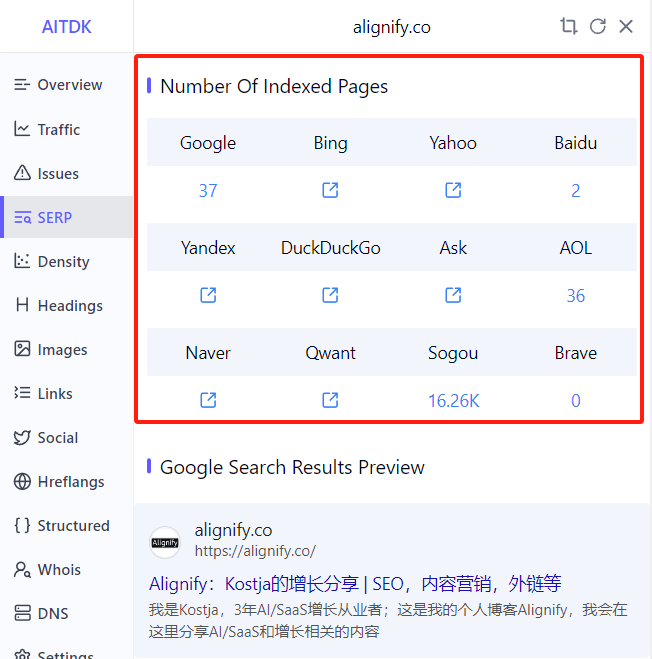
Using browser extensions is the most convenient method to check your website's indexing status in search engines. These extensions can quickly display your website's indexing status across different search engines, including mainstream engines like Google, Bing, Baidu, etc. Extensions typically display the indexing count in the browser toolbar, and clicking will show detailed information. Counts can disagree across vendors—verify with each engine's webmaster tools and URL-level checks.
Search in the Corresponding Search Engine
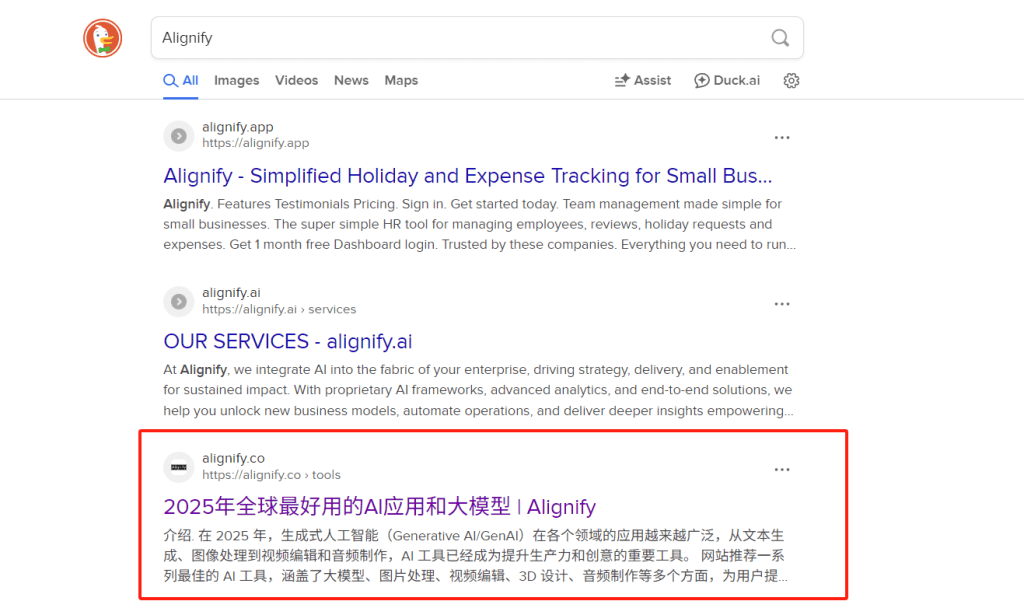
Directly searching for your website's brand keywords or domain name in search engines is the most direct method to verify if your website is indexed. In addition to searching brand keywords, you can also use the site:yourdomain.com search command to view all indexed pages. This command can show which pages of your website are indexed by search engines and the number of indexed pages.
It should be noted that the site: search command is not supported by all search engines. Mainstream search engines like Google, Bing, Baidu, etc., support this command, but some smaller or specialized search engines may not support it.
Your homepage may not be #1 for brand queries when sitelinks, other SERP features, or stronger competitors appear—use Search Console queries/pages plus URL Inspection rather than assuming the algorithm is “wrong.”
Conclusion
The end-to-end flow is URL discovery, crawl and rendering, indexing (including inverted indexes and canonical clustering), then matching and ordering during Serving search results. Google’s public narrative groups this into crawling, indexing, and serving; organic rankings are not for sale, and correct technical setup still does not guarantee visibility for every query.
Separate crawl rules from indexing directives: robots.txt mainly constrains fetches; keeping URLs out of the index relies on noindex, canonical hygiene, internal links, and sitemaps together. For step-by-step triage, use website indexing diagnostics.
To verify presence, combine extensions, brand queries, or site: checks with Search Console; for execution detail, follow the SEO checklist and the topic links embedded throughout this article.